



Steam Gift Card $20
- Only valid for the USA
- Adds 20 US dollars to your US Steam account
- Buy games, DLC and other content
NEVER use these codes to pay fines, fees or deliveries More information
Information
What is Steam and how does a Steam Wallet gift card work?
Steam is the world’s most popular digital gaming service for PC and Mac, giving access to over 100,000 titles including indie games, blockbuster hits, downloadable content, and more. Created by Valve, Steam has grown into a full entertainment hub with massive seasonal sales, user forums, cloud saves, and family sharing. It’s the leading platform for gamers who want the best deals and a smooth experience.
What can I do with a $20 Steam US gift card?
A $20 Steam US code adds prepaid credit to your Steam Wallet. Once added, the balance can be used to purchase games, software, DLC, or even cosmetic items from the Steam store. It’s a safe way to shop without needing to enter your credit card info, and it helps control spending by capping purchases to the gift card balance.
Are US Steam vouchers region-locked?
Yes, Steam gift codes are region-specific. A $20 Steam Wallet code for the US will only work with Steam accounts registered in the United States and will be denominated in USD. If you live in a different region, such as the EU, make sure to select a local Steam gift card to ensure compatibility.
Where can I buy a $20 Steam Wallet code online?
You can buy it right here at Gamecardsdirect, the one-stop gift card shop. Just choose the amount, enter your email address, and pay securely with PayPal, credit card, or another preferred method. After checkout, your Steam code will be sent to your inbox instantly. Please note that this is a digital-only product, no physical card is delivered.
Redeem instructions
Activate your US Steam Gift Card via Steampowered.com
Redeem your US Steam Gift Card on the website Steampowered.com. Follow the steps below to activate your card. Top up your balance and go shop in the Steam Store!
- Go the the Steam website and log in;

- Go to the top right corner to Account detail;
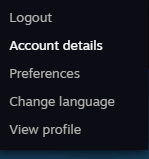
- At the Store & Purchase History, go to + Add funds to your Steam Wallet;

- Click on the option Redeem a Steam Gift Card or Wallet Code in the menu on your right;

- Fill in the code you received from us;

- Continue and complete the process. You have now added the gift card to your account. Shopping time!
- Instant email delivery
- Excellent customer service
- Telephone: +31(0)85 047 75 36
- E-mail support in the weekends
- 1.100.000+ satisfied customers