



Steam Gift Card $10 US
- Only valid for the USA
- Adds 10 US dollars to your US Steam account
- Buy games, DLC and other content
NEVER use these codes to pay fines, fees or deliveries More information
Information
What is Steam and how do Steam gift cards work?
Steam is the world’s largest digital gaming store for PC and Mac, with a library of over 100,000 titles ranging from indie favorites to blockbuster AAA games. Originally developed by Valve, it has grown into a full-fledged gaming platform offering massive sales, game demos, DLC, and community features like chat, mods, and family sharing. Whether you're looking for budget titles or the latest release, Steam is the ultimate place to play.
What can I do with a $10 Steam US card?
A $10 Steam US code lets you safely top up your Steam Wallet with prepaid credit. Once loaded, the balance can be used to buy anything from the Steam store, including games, in-game content, software, or bundles. It's a secure way to avoid entering sensitive banking information online, and it also helps manage your spending by limiting purchases to the card’s value.
Can I use this Steam gift voucher internationally?
No, Steam Wallet vouchers are region-locked. A $10 Steam gift card for the US can only be redeemed on Steam accounts registered in the United States. The value is in US dollars and will not work for EU or other regional accounts. For European customers, Gamecardsdirect also offers a wide range of region-specific Steam cards.
Where can I buy a $10 US Steam gift code online?
Right here at Gamecardsdirect, the one-stop gift card shop. Select the US Steam code amount you want, add it to your cart, and enter your email address. Choose a payment method like PayPal or credit card. After checkout, your Steam digital gift code will be emailed to you within minutes. Please note, we only sell digital products, no physical cards are delivered.
Terms and conditions
Redeem instructions
Activate your US Steam Gift Card via Steampowered.com
Redeem your US Steam Gift Card on the website Steampowered.com. Follow the steps below to activate your card. Top up your balance and go shop in the Steam Store!
- Go the the Steam website and log in;

- Go to the top right corner to Account detail;
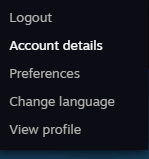
- At the Store & Purchase History, go to + Add funds to your Steam Wallet;

- Click on the option Redeem a Steam Gift Card or Wallet Code in the menu on your right;

- Fill in the code you received from us;

- Continue and complete the process. You have now added the gift card to your account. Shopping time!
- Instant email delivery
- Excellent customer service
- Telephone:
+31(0)85 047 75 36 - E-mail support in the weekends
- 1.100.000+ satisfied customers
Limited customer service
during the holidays.