
Delivery via email
PaysafeCard Classic €10
€ 10,00
Only usable in {RegionLock}.



Steam is the largest digital distribution platform for PC games in the world. Made by the game developer Valve, Steam features thousands of games of every kind and millions of users in all corners of the world. Buying a game on Steam is very easy, simply find the game you want and pay with whatever method you prefer. But the question that many players ask is exactly that: how can I pay for my Steam purchase? In this blog we will analyse the payment methods available for your Steam games.
A Steam wallet top-up can be done instantly using PayPal, PaysafeCard, credit cards, debit cards, bank transfers, and Steam gift cards. The most immediate method, if you buy games on a regular basis, is to have funds in your Steam wallet, so you can use them immediately, but there are many other ways if you just want to pay for a single purchase. Let’s check all your options:
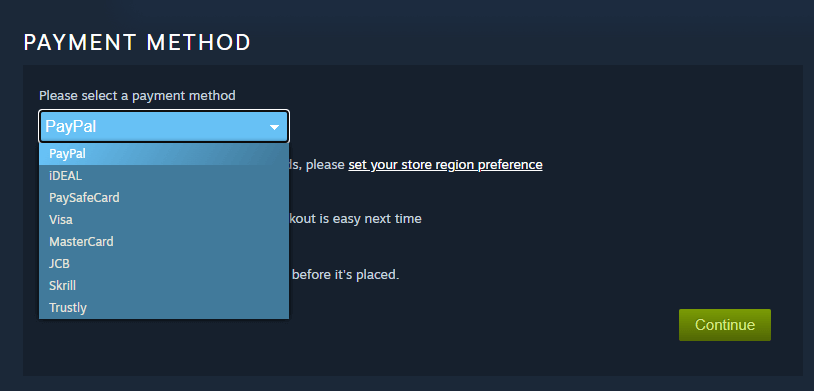

Prepaid cards to add funds to your Steam wallet directly. Safe and easy to use, with no need to share your banking details. Good if you want a wallet and don’t care about leftover funds.

Third-party payment service, very popular worldwide and trustworthy. You can use funds from your PayPal account, or take them from your bank account or any prepaid/credit card. Good if you don’t want to share your bank or card details with many sites.

Your regular prepaid or credit cards. A standard way to pay for millions of people around the world.

A popular credit card in the Far East, you may not have heard of it unless you are in Japan.

Direct and safe payment from your bank account, very common in the Netherlands as iDEAL and now expanding throughout Europe as Wero.

A well-known prepaid card accepted in many online stores. Easy to use and safe to recharge, thanks to readily available gift cards.

An online digital wallet, popular for gaming and international transfers.

Online payment service that bridges the gap between banks and merchants, allowing customers to pay directly from their bank accounts.
All of the above methods can be used to either pay for a single purchase or to add funds to your Steam wallet.
That is up to you, depending on your purchasing habits and needs. Many players prefer to add money to their Steam account in advance. Generally speaking, unless you need a one-time purchase, a Steam gift card is widely regarded as the most practical choice, but lately these cards may be hard to find. PayPal and PaysafeCard are excellent alternatives, shielding your personal data from any potential issues. A prepaid Visa or Mastercard can be good options, too. It’s important to remember that you can use those payment methods to top-up your Steam wallet, too.
Most of the listed payment methods can be recharged with a gift card, and the best place to get gift cards online is right here at Gamecardsdirect, the one-stop gift card shop! No matter if you are looking for a Steam, Paysafe, PayPal or Visa/Mastercard top-up, we have them all. You can get a Rewarble gift card specific to your preferred payment service, with the speed and safety that are our main strengths. We offer secure checkout and instant digital delivery by email, so you can top up your Steam wallet within minutes.
A: Yes, you can use PayPal, PaysafeCard, iDEAL or Steam gift cards to add funds without linking a credit card.
A: Click on your name in the upper right corner, go to Account Details and choose to add funds to your account. You can select the amount you want to add, and pay with any accepted method.
A: All payment methods offer good security. Steam gift cards, PayPal and PaysafeCard are recommended if safety is your primary concern.
A: Yes, you can use a Visa or Mastercard prepaid card on Steam.
A: Yes, as long as you have enough funds on the linked account you can use a Visa debit on Steam.
A: Yes, both credit and prepaid cards from Mastercard are accepted.
A: Yes, it does. It’s actually one of the easiest and safest ways to top up your Steam account.
A: Yes, Steam accepts iDEAL, which is a very popular payment method in the Netherlands and is being expanded throughout Europe as Wero.
A: Once you have added funds to your Steam wallet, it becomes the standard payment method for all your purchases. To use it, simply place items in your cart and pay.
A: Click on your name in the upper right corner and go to Account Details. You will see the amount in your wallet, and have the option to add more credit.
A: No, Klarna is not a supported payment method on Steam.
A: Rewarble is a third-party payment company that sells top-up vouchers for other prepaid payment services, like PayPal, Visa, Mastercard, and dozens of others. An easy and safe way to recharge your payment wallet before using it.